AI
Developing · 0 updatesFact 9/10GitHub Announces Technical Preview of Copilot Desktop App
Article language
English
GitHub has announced a technical preview of the Copilot desktop application. The app is designed to provide a unified 'My Work' view that brings together active sessions, issues, pull requests, and background automations. It is currently available to Copilot Pro, Pro Business, and Enterprise subscribers.
Open article · no sign-in required
Sources and disclosure
The article accurately describes the GitHub Copilot desktop application's technical preview, agent-native design, target audience, and general purpose. Most key claims are directly supported by the provided context. Minor details regarding the specific name of the 'My Work' view and the explicit consolidation of background automations into that view were not explicitly confirmed by the context, but the overall functionality described is consistent with the sources.
Market lens
Agent runtime spending can spill into security, observability, and workflow infrastructure
The market signal is not another chatbot category; it is a possible budget shift toward the control layer around enterprise AI.
Impact path
Runtime spend → infra stack
Signals to watch
- Procurement language around audit logs and cost ceilings
- Security and observability vendors attaching agent controls
- Workflow platforms exposing approval and tool-call governance
Verification schedule
D+1 · Jun 15
Do buyers repeat audit/cost-control requirements?
D+3 · Jun 17
Do vendors publish runtime-control SKUs or partnerships?
D+7 · Jun 21
Do budgets move from pilots into operating infrastructure?
Informational context only — not investment, legal, tax, or financial advice.
GitHub has released a technical preview of a new desktop application for Copilot, designed to support developer workflows through an agent-native architecture. The application is built to bring active work sessions, issues, pull requests, and background automations into a single interface.
Agent-Native Design
The agent-native approach is a software tool design that brings multiple work streams together in one environment. GitHub's Copilot app applies this approach to the desktop, with the goal of letting developers view coding, code review, and project management tasks in one place.
The 'My Work' view is the central part of this design. It provides a single dashboard for a developer's current activity state, including ongoing coding sessions, pull requests awaiting review, assigned issues, and background processes such as CI/CD pipelines or automated tests.
Technical Preview Stage
The technical preview designation indicates that the product is still under development. GitHub has limited the initial release to existing Copilot Pro, Pro Business, and Enterprise subscribers. This approach allows feedback collection from a limited user group and can help with performance and user experience review.
A desktop application can have different operational characteristics from web-based tools or IDE plugins. A standalone application may offer system resource access, offline functionality, and operating system-level integration. It also requires deployment and update management across multiple platforms, along with compatibility with existing development toolchains.
The background automation feature suggests that the application can run tasks without direct developer intervention. Examples may include code linting, security scanning, dependency updates, or test execution. Such features require attention to visibility, control, and auditability.
Participants in the technical preview can expect the kinds of limitations that are common in early-stage software, including feature gaps or differences in stability. Organizations may choose to test the software in non-production environments before using it in production settings.
Position in the Developer Tools Ecosystem
GitHub's announcement reflects a broader trend in developer tools toward adding autonomous agent features. Several companies are integrating AI-based coding assistants into IDEs, and a standalone desktop application is another distribution model. This approach allows work within the GitHub ecosystem without depending on a specific editor or IDE.
The subscription tier restrictions indicate that the feature is being offered to paying subscribers. Compared with the free tier, advanced agent features and unified workflow management are included in separate subscription levels.
The move to a desktop application suggests that GitHub is extending the developer experience beyond the web browser. At the same time, it requires maintaining a consistent user experience across client platforms and managing differences between desktop and web interfaces.
Details Not Yet Publicly Specified
The technical preview announcement does not include several details. The exact system requirements, supported operating systems, and the scope of integration with existing IDEs and development tools are not specified in the available metadata. The scope and limits of background automation, privacy-related details, and how the application behaves in on-premises or air-gapped environments are also not clearly described.
The timeline for general availability has not been announced. It is also not confirmed whether the application supports only GitHub-hosted repositories or also works with GitLab, Bitbucket, or self-hosted Git instances.
Additional information is also needed on data handling and privacy. Details about how background automation processes code and project data, what information is transmitted to GitHub servers, and what protections are in place for sensitive codebases have not been disclosed.
Want follow-up alerts? Subscribe by email after reading the public article.
Market lens
Agent runtime spending can spill into security, observability, and workflow infrastructure
The market signal is not another chatbot category; it is a possible budget shift toward the control layer around enterprise AI.
Impact path
Runtime spend → infra stack
Signals to watch
- Procurement language around audit logs and cost ceilings
- Security and observability vendors attaching agent controls
- Workflow platforms exposing approval and tool-call governance
Verification schedule
D+1 · Jun 15
Do buyers repeat audit/cost-control requirements?
D+3 · Jun 17
Do vendors publish runtime-control SKUs or partnerships?
D+7 · Jun 21
Do budgets move from pilots into operating infrastructure?
Informational context only — not investment, legal, tax, or financial advice.
Visual Briefing
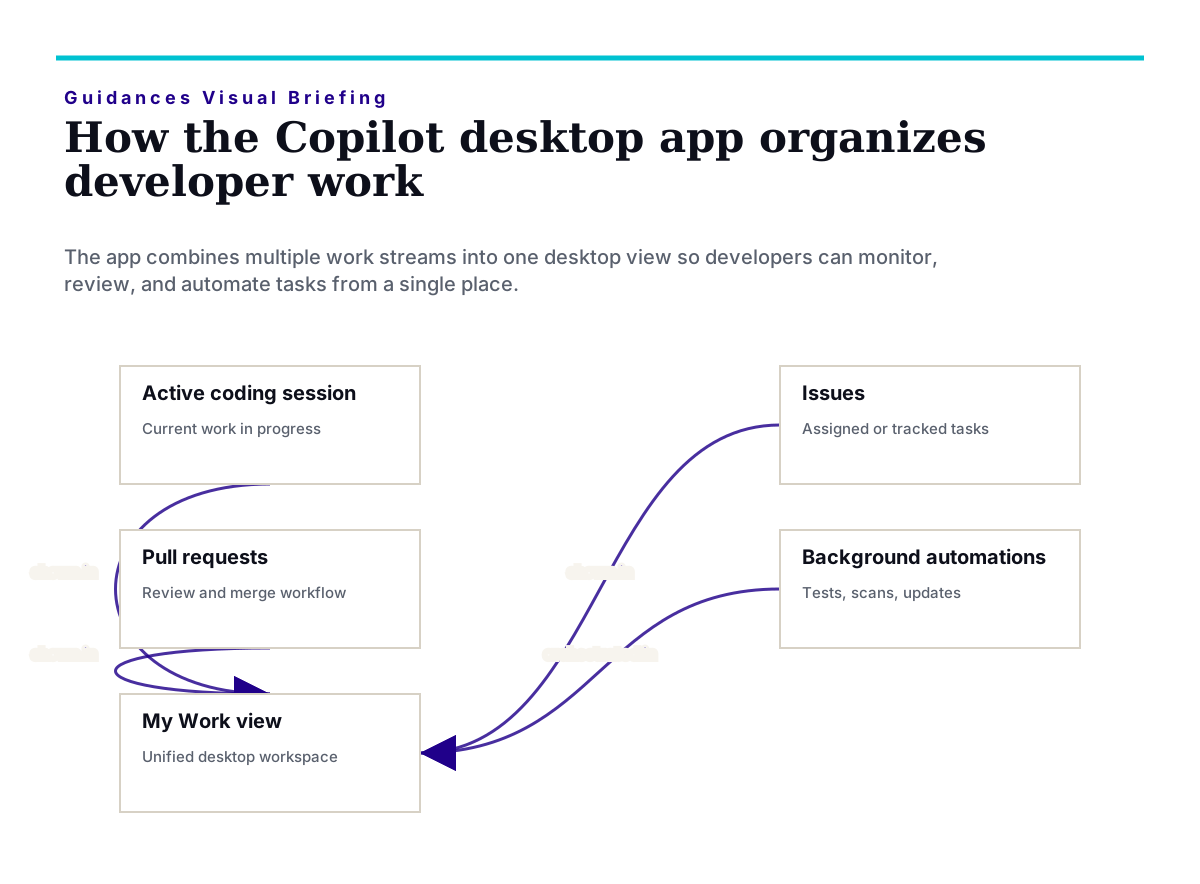
The desktop app brings sessions, issues, pull requests, and automations into one 'My Work' interface.
Corrections and safety
See a factual, privacy, rights, or safety issue? Review the corrections process or contact Guidances before relying on this article for important decisions.